 Zinn® Translate
Correct a translation by hand
Edit any translated string, and keep your wording through every later re-translation.
Machine translation is right most of the time. For the headline, tagline or product name where it matters, you can write the translation yourself.
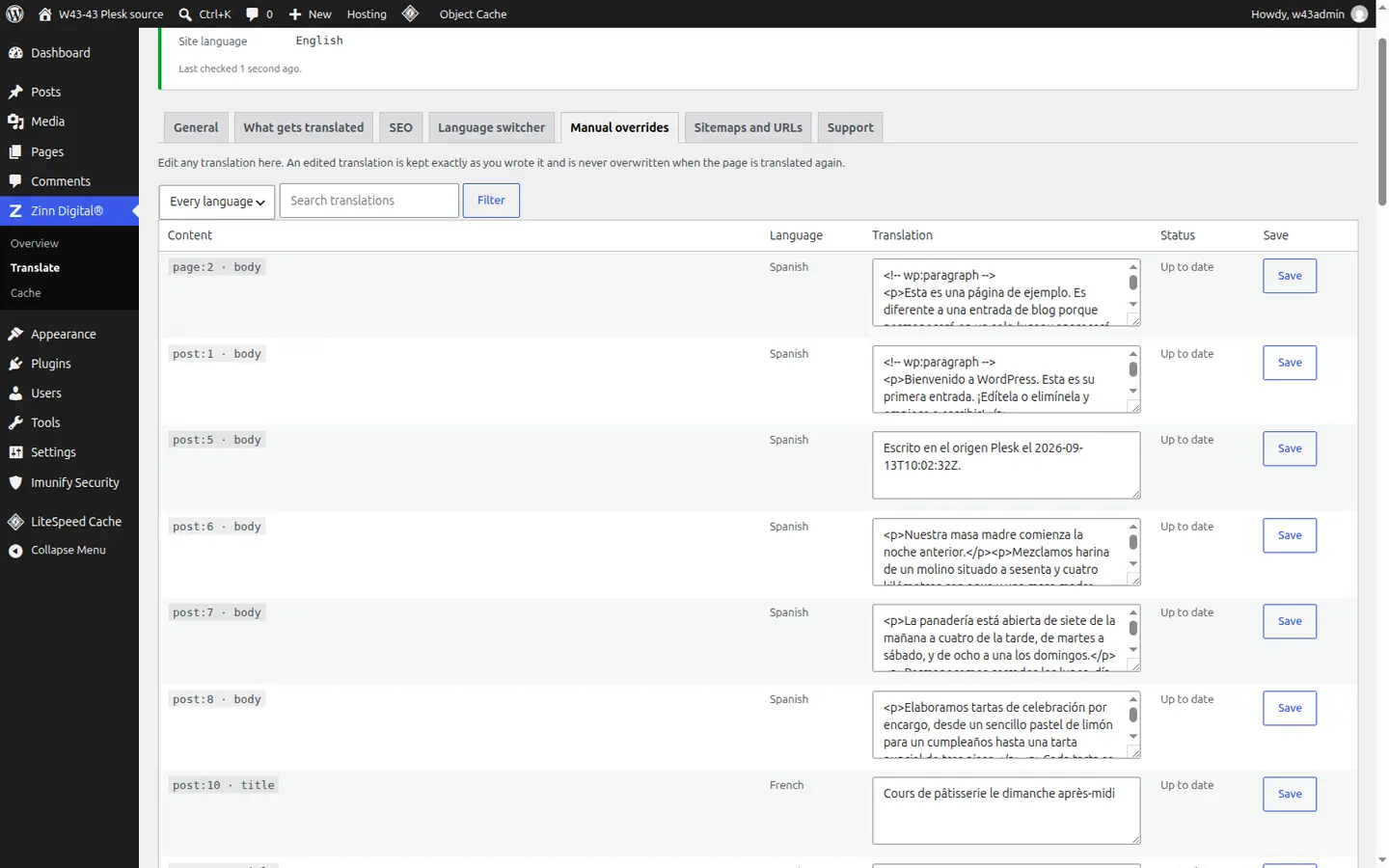
Open Manual overrides
In Zinn Digital® → Translate, open the Manual overrides tab.
Find the string
Use Search translations to find the text you want to change.
Write your version and save
Edit the translation and save. The status changes to Edited by you — kept.
Your wording survives
A string you edited is never overwritten, even when the page is re-translated. Other strings show Up to date, or Source changed — will be redone when the original text has changed.
Better together
Host the site you translate with Zinn Digital®
Zinn® Translate works wherever your WordPress site is hosted, and it needs no hosting plan. Host with us as well and the site, its translation and everything else sit in one dashboard on one invoice.
- The Zinn® Translate plugin is free on any WordPress site, hosted with us or anywhere else
- WordPress and WooCommerce hosting on our own servers, with a CDN
- One account and one invoice for hosting, translation and every other product